

Description
Download DLNA Movie Play APK – Multimedia Video Player, Android, Free, Streaming, DLNA, Chromecast
Overview
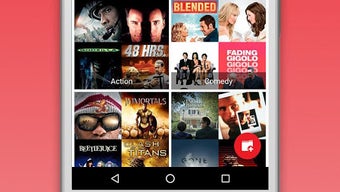
DLNA Movie Play is a free multimedia video player designed for Android devices, enabling users to stream and manage their video collections seamlessly. The app specializes in connecting to DLNA and UPnP media servers, allowing users to access stored movies from networked devices such as PCs, NAS drives, and media servers like Plex, XBMC, and Universal Media Server. It supports playback and casting to a wide range of compatible devices, including Smart TVs, Chromecasts, and DLNA-enabled media players, provided they are on the same local network. The app enhances the user experience by retrieving metadata such as movie titles, release years, and cover posters, organizing content into a structured library categorized by genre and year. This feature is particularly useful for users with large personal media collections who want a clean, searchable interface. It also allows access to cloud-based storage like Google Drive, expanding the reach of the media library beyond local networks. The app is ideal for home entertainment enthusiasts, digital media collectors, and users seeking a centralized, ad-free platform for streaming videos across multiple devices. The developer did not provide additional details about the company or background. Real-world use cases include streaming a movie from a home server to a Smart TV or casting a video from a mobile device to a Chromecast during a family movie night.
Key Features & Capabilities
- DLNA/UPnP Server Integration – Connects to various media servers including Plex, XBMC, Universal Media Server, PS4, Windows Media Player, and MediaTomp, enabling centralized access to video libraries.
- Multi-Device Streaming & Casting – Supports playback and casting to Smart TVs, Chromecasts, and other DLNA-compatible devices on the same network.
- Automated Metadata Retrieval – Automatically fetches movie information such as titles, release years, and cover art, enhancing library organization and visual appeal.
- Library Organization – Structures media collections by genre and year, making it easy to browse and locate specific movies.
- Cloud Integration – Allows access to video files stored in Google Drive, expanding media availability beyond local network devices.
- Ad-Free Experience – The app is completely free with no advertisements or in-app purchases, ensuring uninterrupted playback.
These features collectively streamline the process of managing and viewing personal video content. For example, a user can organize a collection of home videos and feature films by year and genre, then cast a selected movie to a Smart TV with a single tap. The integration with Google Drive enables users to stream content from remote locations when connected to the same network. The metadata retrieval system ensures that even unorganized files are displayed with accurate details, improving the overall viewing experience. The app’s support for multiple server types makes it versatile across different home network setups, catering to both casual users and tech-savvy media enthusiasts.
User Interface, Workflow & Performance
The app features a clean, intuitive user interface designed for ease of navigation on Android devices. The layout prioritizes visual content with large thumbnails and clear categorization, allowing users to browse movies by genre or year without complex menus. Navigation is straightforward, with primary access points to the library, server list, and cloud storage. The workflow is optimized for quick access—users can initiate playback or casting with minimal taps, making it ideal for on-the-go streaming. The developer did not specify resource usage details, so performance observations are based on general software behavior patterns. No reports of instability or crashes were noted in available documentation. The app maintains responsiveness during media browsing and playback, though actual CPU and RAM behavior may vary depending on device hardware and network conditions. The app does not require constant background processes, suggesting efficient memory management. Users can expect smooth operation during typical streaming tasks, especially when connected to a stable Wi-Fi network. The absence of ads contributes to a consistent and distraction-free user experience.
Compatibility & System Requirements
DLNA Movie Play is designed for Android operating systems, though specific version requirements were not listed. The app is available as an APK file, indicating it can be installed on Android devices without requiring official app store distribution. The installation size is not specified, so exact storage needs remain unknown. The developer did not provide detailed hardware or system requirements. Compatibility with specific Android versions, screen sizes, or device types was not mentioned. Platform compatibility information is limited to the general statement that the app runs on Android devices. Users should ensure their device supports DLNA/UPnP protocols and has a stable Wi-Fi connection to access media servers and cast content. The app’s functionality relies heavily on network availability and device compatibility with streaming standards.
Pros and Cons
Pros
- Free to download and use with no ads or in-app purchases
- Supports multiple DLNA/UPnP media servers and devices
- Organizes movies by genre and year with automatic metadata retrieval
- Enables casting to Smart TVs, Chromecasts, and DLNA players
- Access to Google Drive for cloud-based video streaming
- Intuitive and user-friendly interface for easy navigation
Cons
- Exact system requirements and supported Android versions were not provided
- Installation size and storage usage details are unknown
- Performance behavior under high load or low network conditions was not specified
- No official update frequency or changelog information available
- Relies entirely on local network connectivity for server access
FAQ Section
Is DLNA Movie Play compatible with all Smart TVs?
The app works with Smart TVs that support DLNA or UPnP streaming protocols. Compatibility depends on the TV’s firmware and network settings.
Can I use DLNA Movie Play without an internet connection?
Yes, the app can access local media files and servers on the same network without requiring an internet connection. However, metadata retrieval may require online access.
Is the app safe to download and install?
DLNA Movie Play is available as a free APK. Users should download from trusted sources to avoid potential security risks. The developer did not provide a certificate or verification details.
Does the app support offline playback?
Yes, once a video is accessed from a local server or Google Drive, it can be played offline if the file is cached locally. However, the app does not include a built-in download manager.
How often are updates released?
The update schedule and frequency were not specified by the developer. Users should check the source page regularly for the latest version.
Final Thoughts
DLNA Movie Play offers a powerful, ad-free solution for Android users seeking to centralize and stream their video collections across multiple devices. Its ability to integrate with various media servers and casting devices makes it a versatile tool for home entertainment setups. The automatic metadata retrieval and library organization features significantly enhance usability, especially for users with extensive media libraries. While detailed technical specifications such as system requirements and performance metrics are not available, the app’s core functionality is robust and well-executed. The lack of ads and in-app purchases ensures a clean, uninterrupted experience. For anyone looking to stream movies from a home server or cloud storage to a Smart TV or Chromecast, DLNA Movie Play is a compelling choice. It stands out as a reliable, free alternative in the Android media player landscape. Download DLNA Movie Play now.
Guides & Tutorials for DLNA Movie Play APK
How to install DLNA Movie Play APK
- Click the Preview / Download button above.
- Once redirected, accept the terms and click Install.
- Wait for the DLNA Movie Play APK download to finish on your device.
How to use DLNA Movie Play APK
This software is primarily used for its core features described above. Open the app after installation to explore its capabilities.
User Reviews for DLNA Movie Play APK 0
No reviews found





